InPost PrestaShop parcel machines are a staple of every online store in Poland today. Customers love this delivery option because it's cheap, convenient and available 24 hours a day. If you run a store on PrestaShop and don't yet offer Parcel Machines, you're losing sales!
In this article, we will show you how to easily add InPost Parcel Machines to your PrestaShop store using our module.
Why are Parcel Machines a must-have for any store?
Customers want it - More than 70% Poles choose Parcel Machines as their preferred delivery method
Cheaper delivery - cost often half that of a courier to your home
More sales - stores with Parcel Machines have higher conversions
Fewer complaints - customer chooses a pickup point that is convenient for him
Automation - everything works by itself after configuration
Tip
Studies show that the lack of Parcel Post options can be the reason why up to 40% customers abandon their shopping carts!
Our PrestaShop Parcel Machines InPost module - the best solution on the market
Why did we choose to create our own module? Because existing solutions were either too complicated or did not work properly. Our module is:
✓ Easy installation - 5 minutes and done ✓ Intuitive configuration - without knowledge of programming ✓ Full automation - labels generate themselves ✓ Map of Parcel Machines - customer selects a point from the interactive map ✓ Technical support - we will help in every situation ✓ Regular updates - always the latest InPost features
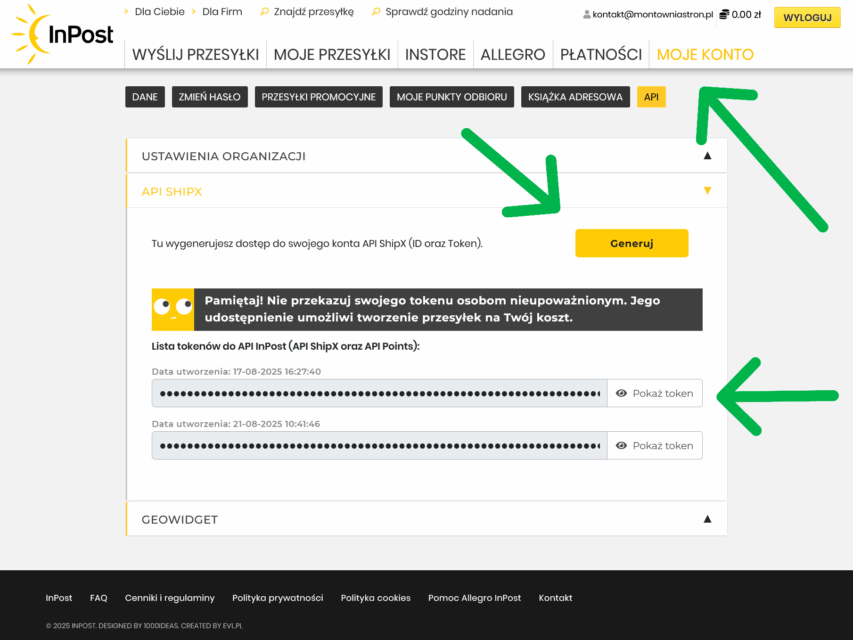
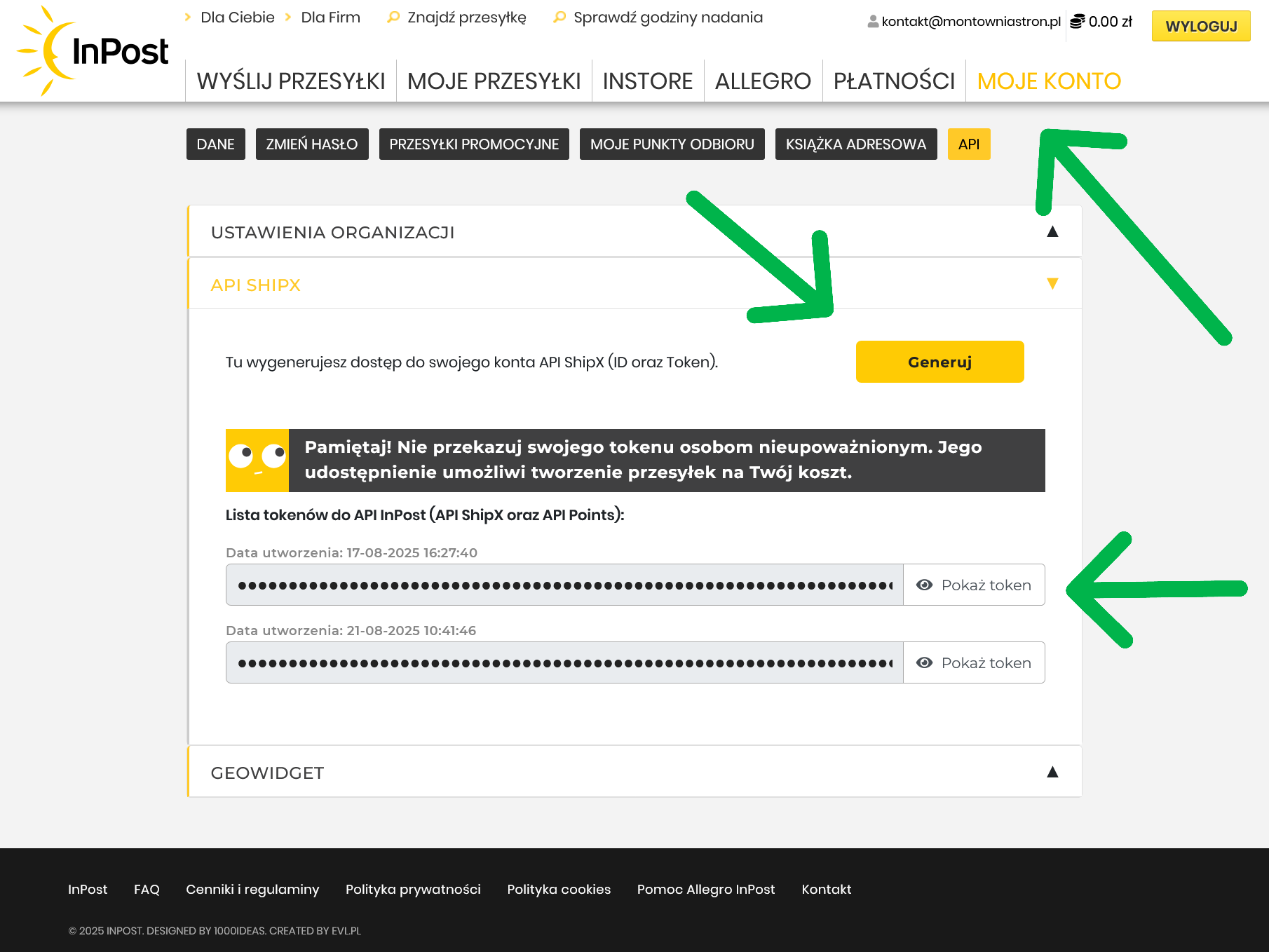
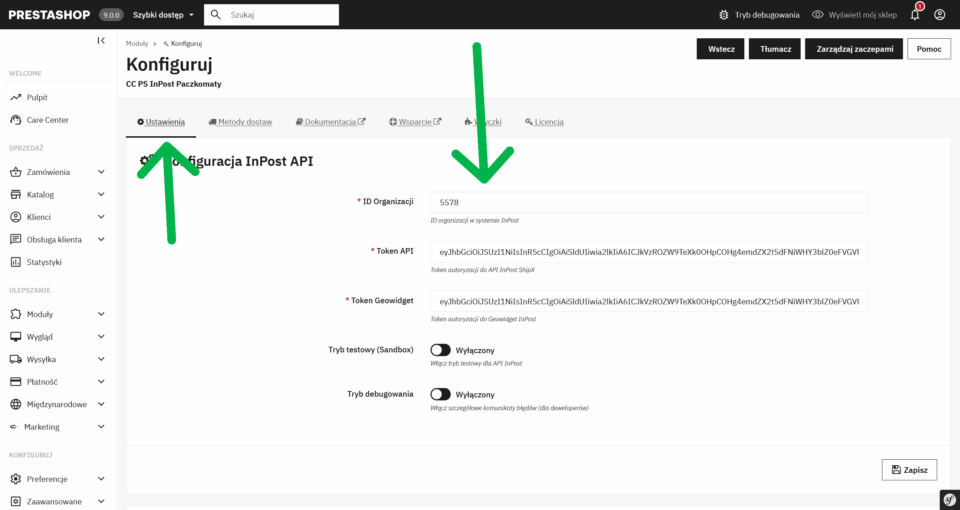
Go to ORGANIZATION SETTINGS section, save ORGANIZATION ID
Go to SHIPX API section, click the yellow GENERATE button, save the generated TOKEN
Go to GEOWIDGET section, click the yellow GENERATE button, save the generated TOKEN
You have all the necessary data prepared (organization ID, ShipX Token and Geowidget Token)
API token example:
VlZjUzNTp0RDFkVGtjdnR4R3FRdTRYYVJJY0eyJhwia2lkIiAUtNjJiYi00YT1iYTBjLTJiNDU2OyI6IiIsInV1aWQiOiI1MmI5NDTJhYjNCcHdiTUNZIiRlLWI1NGItZTIpmHKGzfWjcG5PiR14Sm9DaTgTW2dj8vaj_WFX5pmXLGD_uCgEka3PSSdZRBJKqwrpO55MzRjYzBmYmIxIiwijw1vGmrVhCMyU1AOvhtSQc2NvcGUiOi6ICJzQlpXVzFNZzVlQnpDYU1XU3JvTlBjRWFveFpXcW9Ua2FuZVB3X291LWxvIn0.eyJleHAiOjIwNzA4MDA4NjAsImlhdCI6MTc1NTQ0MDg2MCwianRpIjoiMa5CvoEG1yWGr9eV8ELOO0dZzt3ZZUI2SyXIOsehs9SXs4UM7p0V6NIfqeqPwElSD2_WElOqysyvD8_xDJBCTRZIdNf88WE4NjBhOTktNTg4My00MTkyLTk0MjItY2ViNWUwYWYxZDk2IiwiaXNzIjoiaHR0cHM6Ly9sb2dpbi5pbnBvc3QucGwvYXV0aC9yZWFsbXMvZXh0ZXJuYWwiLCJzdWIiOiJmOjEyNDc1MDUxLTFjMDMtNGU1OSwidHlwbE5SMVNOOFl5a2tTIjoiQmVhcmVyIiwiYXpwIjoic2hpcHgiLCJzZXNzaW9uX3N0YXRlIjoiMjVhNTA2YTJvcGVuaWQgYXBpOmFwaXBvaW50cyBhcGk6c2hpcHgiLCJzaWQiOiIyNWE1MDZhNS02MmJiLTRhNGUtYjU0Yi1lMjkzNGNjMGZiYjEiLCJhbGxvd2VkX3JlZmVycmVycNjNy0zYWU4LTRlZmUtYTg2OC1hZTBiNTQ4NzMxZDUiLCJlbWFpbCI6ImtvbnRha3RAbW9udG93bmlhc3Ryb24ucGwifQ.foB2jSCU6N2Sp7iTjRKpLWwoVGWp4KvPjLYUgKGTSHYTOG99Sjs6FUUy5mGl0UO-SGOMM25FTIaseaZ2PEnGdjx5oSMvlVc9ByypiiobGciOiJSUzI1NiIsInR5cCIgOiAiSldUIiSUJ2MOv4Wr8QHV2Tvxo-rXV2-rpRwZQxsa_0MrTnTzklAeSCh_j0g-2aVkb
Note
The API token is like the password to your account - don't share it with anyone and keep it secret!
Once properly configured, the order process looks like this:
Customer adds products to the cart
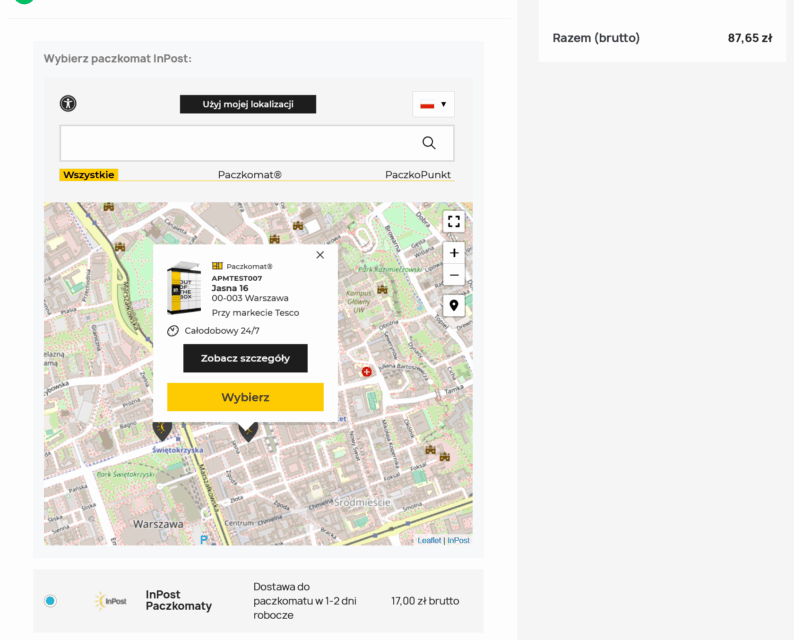
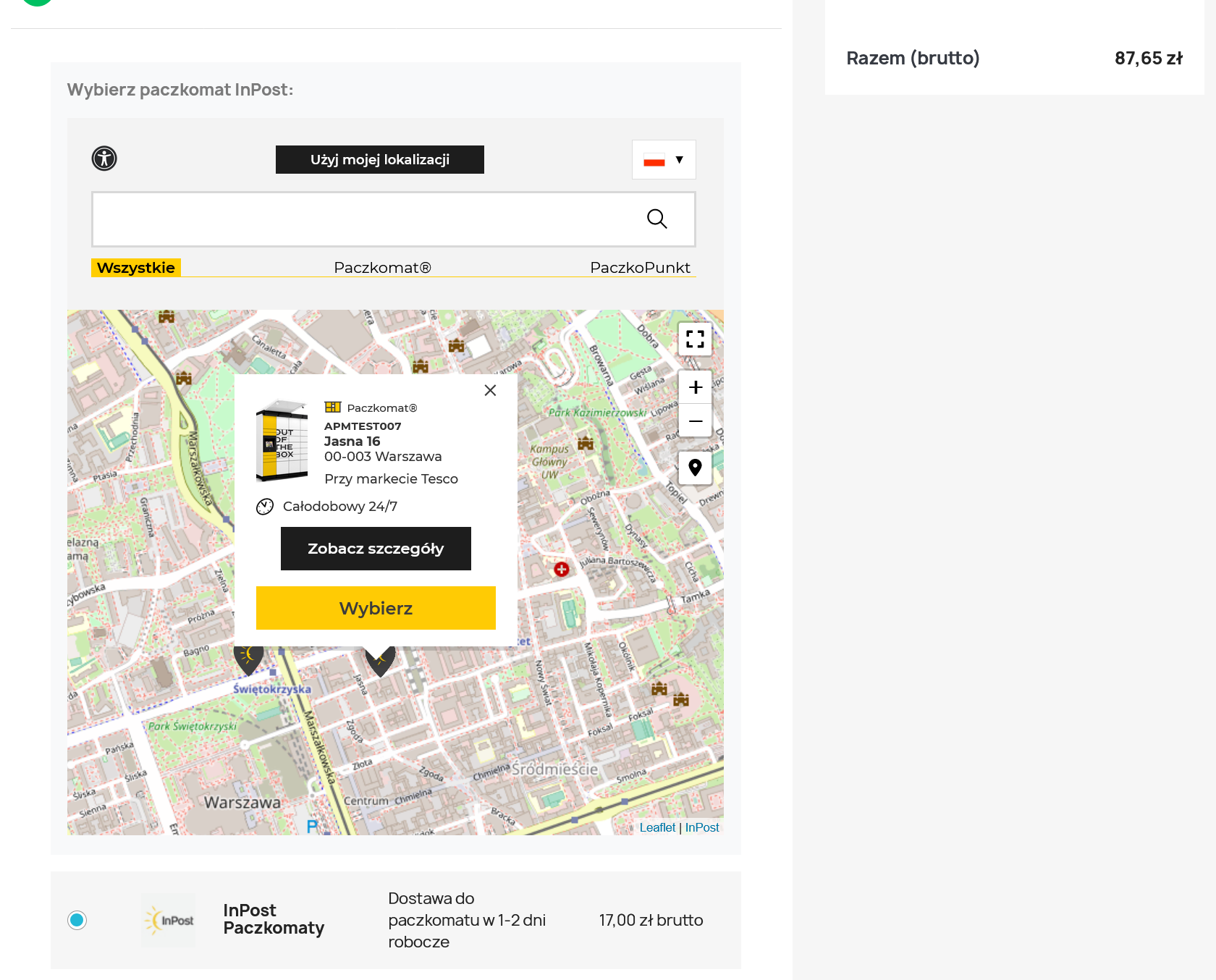
In checkout, selects "Parcel Post InPost"
Map opens - customer selects a convenient point
Parcel Machine data are saved automatically
Once the order is paid for, a label is generated
Customer receives notification of package shipment
InPost announces delivery to Parcel Machine
What will you need to do once you're set up?
Almost nothing! The module works automatically:
✓ Labels - are generated automatically ✓ Notifications - InPost sends text messages to customers ✓ Tracking - customers can track shipments ✓ Receipt - couriers pick up packages themselves
All you have to do is:
Pack orders
Apply printed labels
Hand over the parcels to the InPost courier
That's it!
The rest happens automatically. InPost takes care of delivery, notifications and customer service at pickup points.
The most common questions
Does the module work with all versions of PrestaShop? Our module is compatible with PrestaShop 1.7 and newer versions, including PrestaShop 9.
Can I set up free delivery to Parcel Machines? Yes! You can set free delivery from a certain order amount or as a fixed option.
What if I have a configuration problem? We offer full technical support. Contact us and we will help you with the configuration.
Are there any additional fees? No, you only pay once per module. InPost charges delivery fees according to its rates.
Why choose our module?
Our Advantage
Why it's important
Simplicity of installation
Even non-technical people will install
Intuitive configuration
You don't have to be a programmer
Full support
We will help in any situation
Regular updates
Always compatible with the latest InPost API
Polish documentation
Everything in Polish, understandable
A proven solution
It is already used by hundreds of stores
Don't delay - start selling more today!
InPost parcel machines are not an option - they are a necessity in today's e-commerce. Every day without this delivery option means lost sales and dissatisfied customers choosing the competition.
Our module is the fastest and easiest way to add Parcel Machines to your PrestaShop store. It takes 15 minutes to install, another 10 minutes to configure, and you'll reap the benefits for years to come.
Special offer
Buyers of our module get the bonus of free support for the first setup. Simply write to us after the purchase!
Contains information related to marketing campaigns of the user. These are shared with Google AdWords / Google Ads when the Google Ads and Google Analytics accounts are linked together.
90 days
__utma
ID used to identify users and sessions
2 years after last activity
__utmt
Used to monitor number of Google Analytics server requests
10 minutes
__utmb
Used to distinguish new sessions and visits. This cookie is set when the GA.js javascript library is loaded and there is no existing __utmb cookie. The cookie is updated every time data is sent to the Google Analytics server.
30 minutes after last activity
__utmc
Used only with old Urchin versions of Google Analytics and not with GA.js. Was used to distinguish between new sessions and visits at the end of a session.
End of session (browser)
__utmz
Contains information about the traffic source or campaign that directed user to the website. The cookie is set when the GA.js javascript is loaded and updated when data is sent to the Google Anaytics server
6 months after last activity
__utmv
Contains custom information set by the web developer via the _setCustomVar method in Google Analytics. This cookie is updated every time new data is sent to the Google Analytics server.
2 years after last activity
__utmx
Used to determine whether a user is included in an A / B or Multivariate test.
18 months
_ga
ID used to identify users
2 years
_gali
Used by Google Analytics to determine which links on a page are being clicked
30 seconds
_ga_
ID used to identify users
2 years
_gid
ID used to identify users for 24 hours after last activity
24 hours
_gat
Used to monitor number of Google Analytics server requests when using Google Tag Manager
1 minute
SourceBuster is used by WooCommerce for order attribution based on user source.
Name
Description
Duration
sbjs_session
The number of page views in this session and the current page path
30 minutes
sbjs_udata
Information about the visitor's user agent, such as IP, the browser, and the device type
session
sbjs_first
Traffic origin information for the visitor's first visit to your store (only applicable if the visitor returns before the session expires)
session
sbjs_current
Traffic origin information for the visitor's current visit to your store
session
sbjs_first_add
Timestamp, referring URL, and entry page for your visitor's first visit to your store (only applicable if the visitor returns before the session expires)
session
sbjs_current_add
Timestamp, referring URL, and entry page for your visitor's current visit to your store
session
sbjs_migrations
Technical data to help with migrations between different versions of the tracking feature












Is it possible for you to add a dedicated feature for us to this prestashop module?
Yes, it is possible 🙂 Please contact us so that we can discuss the details and prepare a solution tailored to your needs.